
Free PDF Merge Tool for Developers
Overview
La extensión del navegador PDF.co ofrece una solución simplificada para combinar varios documentos PDF en un solo archivo. Diseñada pensando en los desarrolladores, simplifica una tarea común en la gestión de documentos y la automatización de flujos de trabajo. La herramienta permite a los usuarios combinar PDFs desde el almacenamiento local o plataformas en la nube como Google Drive, mejorando la productividad de los profesionales que manejan la compilación de documentos a diario. Su integración con el ecosistema más amplio de ByteScout sugiere un enfoque en utilidades centradas en el desarrollador, aunque la herramienta en sí es accesible para usuarios no técnicos que buscan una solución rápida y sin costo.
El software funciona completamente en el navegador, eliminando la necesidad de instalaciones complejas o configuraciones a nivel del sistema. Esto lo hace ideal para usuarios que priorizan la comodidad y la seguridad. Todo el procesamiento de archivos ocurre localmente o en servidores seguros, con datos encriptados durante la transmisión y eliminados automáticamente después del procesamiento. La extensión está disponible como prueba gratuita durante un mes, con planes de pago opcionales para uso extendido, aunque los detalles de precios más allá del acceso gratuito no se divulgan públicamente en la información proporcionada.
Los usuarios objetivo incluyen desarrolladores, creadores de contenido y personal administrativo que manejan con frecuencia la consolidación de documentos. Casos de uso reales incluyen combinar contratos, compilar informes o organizar documentación de proyectos. La compatibilidad de la herramienta con múltiples sistemas operativos—Windows, Mac y Linux—garantiza una amplia accesibilidad en diferentes entornos de trabajo.
Key Features & Capabilities
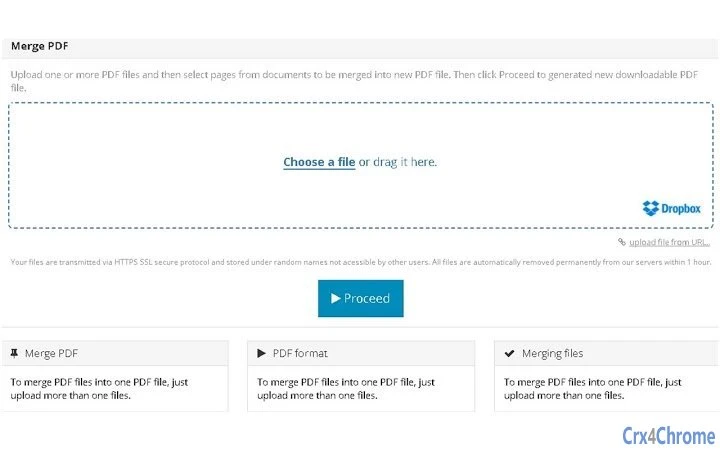
- PDF Merging – Combine multiple PDF files into one cohesive document with a single click. Users can upload files from their local device or cloud storage, making it ideal for assembling reports, forms, or legal documents.
- Browser-Based Processing – The tool runs directly in the browser, reducing the need for desktop software installations and ensuring compatibility across platforms.
- Cloud Integration – Supports seamless file access from Google Drive, allowing users to merge documents stored remotely without downloading them first.
- Security & Privacy – Files are encrypted during transfer and automatically deleted after processing, minimizing data exposure risks.
- Developer-Friendly API – An API is available for developers to integrate PDF merging functionality into custom applications, supporting automation and scalability.
Each feature is designed to reduce friction in document workflows. For example, developers can script automated merging tasks using the API, while end users benefit from a simple drag-and-drop interface. The ability to work with cloud-stored files enhances collaboration, especially in remote or hybrid teams. The extension’s lightweight size of 1.2 MB ensures fast loading and minimal impact on system performance.
User Interface, Workflow & Performance
The user interface is minimal and focused on core functionality, prioritizing ease of use over visual complexity. The extension integrates directly into the browser, presenting a clean panel where users can upload files via drag-and-drop or file selection. Navigation is intuitive, with clear visual cues indicating file status and progress during merging.
Workflow efficiency is high—users can upload multiple files, arrange them in order if needed, and initiate merging with a single action. The process is immediate, with no lengthy processing delays reported in the provided information. The developer did not specify resource usage details, but the extension’s lightweight size suggests low CPU and RAM consumption during operation.
Stability appears to be consistent, as the tool is part of a larger project with established infrastructure. However, exact performance data under heavy workloads or large file sets was not provided. General software behavior patterns suggest reliable operation for standard use cases, though real-world performance may vary based on network speed and file size.
Compatibility & System Requirements
The software is compatible with Windows, Mac, and Linux operating systems, ensuring broad accessibility across desktop environments. It functions as a browser extension, meaning it relies on modern web browsers such as Chrome, Firefox, or Edge for execution. The installation size is 1.2 MB, which is compact and suitable for quick deployment.
Exact system requirements were not listed. Compatibility information is limited to the supported platforms. No specific hardware requirements, such as minimum RAM or processor speed, were provided. The developer did not specify whether the tool supports older browser versions or requires specific browser settings to function.
Pros and Cons
Pros
- Free to use with a one-month trial available
- Simple, intuitive interface for quick PDF merging
- Supports Google Drive integration for cloud file access
- Files are encrypted and deleted after processing
- Available on Windows, Mac, and Linux
- Lightweight size (1.2 MB) with minimal system impact
Cons
- Exact performance metrics and system requirements not disclosed
- Advanced features may require a paid subscription
- Browser dependency limits offline functionality
- API access may require technical expertise
- Long-term free usage details not specified
FAQ Section
Is the PDF merge tool available for free?
Yes, the tool is available for free with a one-month trial. After the trial, users may need to subscribe to a paid plan for continued access, though specific pricing tiers are not detailed in the provided information.
Can I use this tool offline?
The tool requires an active internet connection to function, as it operates within the browser and processes files through online services. Offline usage is not supported due to its cloud-based architecture.
Is my data safe when using the tool?
Yes, files are encrypted during transmission and automatically deleted after processing. The developer states that data is not stored or transmitted beyond the session, ensuring privacy and security.
Does the tool support merging PDFs from Google Drive?
Yes, the extension supports direct integration with Google Drive, allowing users to select and merge PDFs stored in their cloud account without downloading them first.
Is there a developer API available?
Yes, an API is available for developers who wish to integrate PDF merging functionality into their own applications or workflows.
Final Thoughts + CTA
PDF.co’s browser extension delivers a reliable, secure, and efficient way to merge PDF files across multiple platforms. Its developer-focused design, combined with ease of use and strong privacy safeguards, makes it a compelling option for professionals and teams managing document workflows. While some technical details remain unspecified, the tool’s core functionality performs as expected with minimal friction.
It stands out for its seamless cloud integration, lightweight footprint, and commitment to data security. Users who frequently handle document consolidation—especially developers and remote teams—will find significant value in this tool.
Download PDF.co now and streamline your PDF merging tasks with confidence.







